laravel-uploads maintained by darvis
darvis/laravel-uploads



One place for every file people upload to your Laravel application. A file becomes
an Upload row that knows which model it belongs to, which collection it is in,
whether it is public or private, who uploaded it and whatever extra data you keep
with it. From that row the package makes the thumbnails you configured, renders a
PDF to an image per page, hands out permanent or signed URLs, and removes the files
when the upload is deleted for good.
A light alternative to a full media library: one table, one model, one trait, one action, and an optional pair of Livewire components for the upload form and the administration.
Features
- One model:
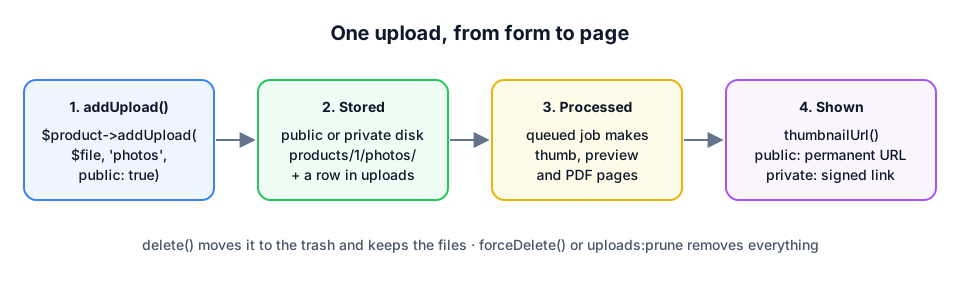
Uploadwith a polymorphic owner,collection,disk,path,name,mime_type,size,is_public,sort_order,meta,conversionsandprocessed_at HasUploadstrait:$product->addUpload($file, 'photos', public: true),uploadsIn('photos'),firstUpload(),reorderUploads()- Public or private per upload: a permanent URL for public files, a signed link that expires for private files, with a policy you can replace
- Conversions from config: named sizes in
jpg,pngorwebp,coverorcontain, generated by a queued job next to the original on the same disk - PDF pages: a PDF is rendered to one image per page (Imagick or
pdftoppm) and gets a thumbnail from its first page - Extra data in a
metaJSON column:meta('caption'),setMeta('print.layer_height', 0.2) - Soft and hard delete:
delete()keeps the files for a restore,forceDelete()removes everything,uploads:pruneempties the trash after a number of days - Administration:
UploadStatisticswith totals per disk and collection, and a Livewire overview with filters and the trash - Livewire upload manager: upload, caption, drag to sort and remove for one collection of one model, with direct uploads to S3 when Livewire is set up for it
- Dutch translation of the components
Requirements
- PHP 8.2 or higher with the GD extension
- Laravel 11, 12 or 13
- Livewire 3.6+ or 4 for the two components (optional)
- Imagick with Ghostscript, or the
pdftoppmbinary, for PDF pages (optional)
Installation
composer require darvis/laravel-uploads
php artisan migrate
php artisan storage:link
Installation & configuration has the steps up to a first upload with thumbnails, the publish tags and every config key.
New to Laravel? The tutorial takes you from a fresh Laravel app to a page where you upload product photos and see their thumbnails, and explains every step on the way.
Quick start
use Darvis\Uploads\Models\Concerns\HasUploads;

class Product extends Model
{
    use HasUploads;
}
$photo = $product->addUpload($request->file('photo'), 'photos', public: true, meta: ['caption' => 'Front']);
$print = $product->addUpload($request->file('print'), 'files', meta: ['layer_height' => 0.2]);

$photo->thumbnailUrl();          // the thumb conversion, or the original until the job ran
$photo->conversionUrl('preview');
$print->downloadUrl();           // signed link, 30 minutes, checked by UploadPolicy
$print->humanSize();             // "1.2 MB"

$product->uploadsIn('photos')->get(); // ordered, without the trash
$product->firstUpload('photos');
<livewire:uploads.upload-manager :model="$product" collection="photos" :public="true" accept="jpg,jpeg,png,webp" />
<livewire:uploads.uploads-overview />
Conversions are defined once in config/uploads.php; thumb (300×300, cover, webp)
and preview (1200, contain, webp) ship by default. A PDF gets one image per page
plus the same conversions from its first page.
Documentation
Full documentation: https://arviddejong.github.io/laravel-uploads/
| Page | |
|---|---|
| Tutorial: your first upload | Step by step from a fresh Laravel app to a working photo page, for developers new to Laravel |
| How it works | Owner, collection, disks, conversions, the queue, signed links and the trash in plain words |
| Installation & configuration | From composer require to a first upload, and every config key |
| Quick start | A product with public photos and a private print file, form, gallery and download |
| The Upload model | Columns, relations, URLs, meta data, the trait and the action |
| Conversions & PDF pages | Thumbnails from config, the job, PDF drivers |
| Private files | Signed links, the policy, S3 with two buckets |
| Livewire components | The upload manager and the overview |
| Administration & trash | Soft delete, hard delete, pruning, statistics |
| Testing | Test your own code around uploads |
| Troubleshooting | Error messages and symptoms with cause and fix |
| FAQ | Short answers to common questions |
Laravel Boost
The package ships Laravel Boost resources: a guideline
and a laravel-uploads-development skill. Run php artisan boost:install, or
php artisan boost:update --discover in a project that already uses Boost.
Testing
composer test      # Pest
composer lint      # Pint, check only
composer format    # Pint, fixes the style
composer analyse   # Larastan, level 8
Changelog
See CHANGELOG.md.
Support the package
If darvis/laravel-uploads saves you time, buy me a beer 🍺: sponsor me on GitHub.
Contributing
See CONTRIBUTING.md.
Security
Found a security problem? Please report it privately, see SECURITY.md.
License
MIT, see LICENSE.